
After using various watches and fitness trackers over the years, I was really proud to own the Pixel Watch 2, and enjoyed it more than I thought possible. In the previous post I discussed what brought me over to Wear OS. Now it was time to live my dream and design my own watch face. I wanted to create something that I would want to use daily, and also share it with others. I soon learned that using Facer would help me to get to the next chapter in this quest.
Switching from my Fitbit Sense to the Pixel Watch 2 was the step I needed to build my very first watch face. The tools for Wear OS were more user-friendly to me than the ones for Fitbit, and I was able to understand how they worked. My mind raced with ideas and while I wanted to get started right away, I needed to slow down, select a single project and learn how to create a watch face from start to finish.
Discovering Facer
After my initial frustrations with less capable tools, I searched online for a better solution for Wear OS watch face design. I soon discovered Facer (facer.io), a website that promised to be the #1 premium watchface designer and offered everything I needed: a simplified creator for attractive designs and easy global distribution. Upon reading Facer’s About page, which listed thousands of free watch faces, powerful editing tools, and seamless sharing, the platform’s vision looked almost too good to be true:
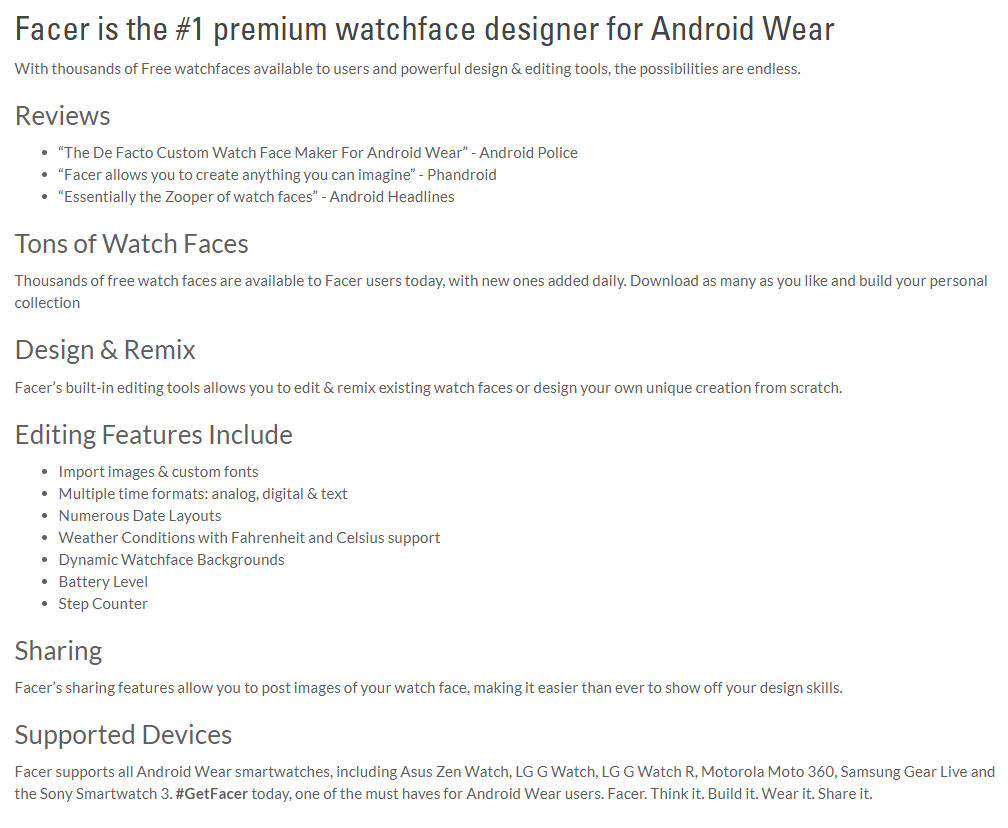
Facer seemed to have all of the features I needed, but would it live up to its own hype? Would it be easy to use, yet provide powerful features to separate my watch faces from the tens of thousands of others out there? Could I actually use it and create a watch face I would be proud to use daily? Could I distribute my creations to others and would they use it? I was determined to find out.
Using Facer
Facer is not a program that needs to be installed on a computer. Instead, it runs directly through the browser. That makes it instantly compatible with Windows, Mac, and even Chromebooks. If inspiration strikes, I could find a web browser, log in and get to work, or even pick up from from where I left off on a completely different computer. This seamless, platform-agnostic approach makes using Facer incredibly convenient.
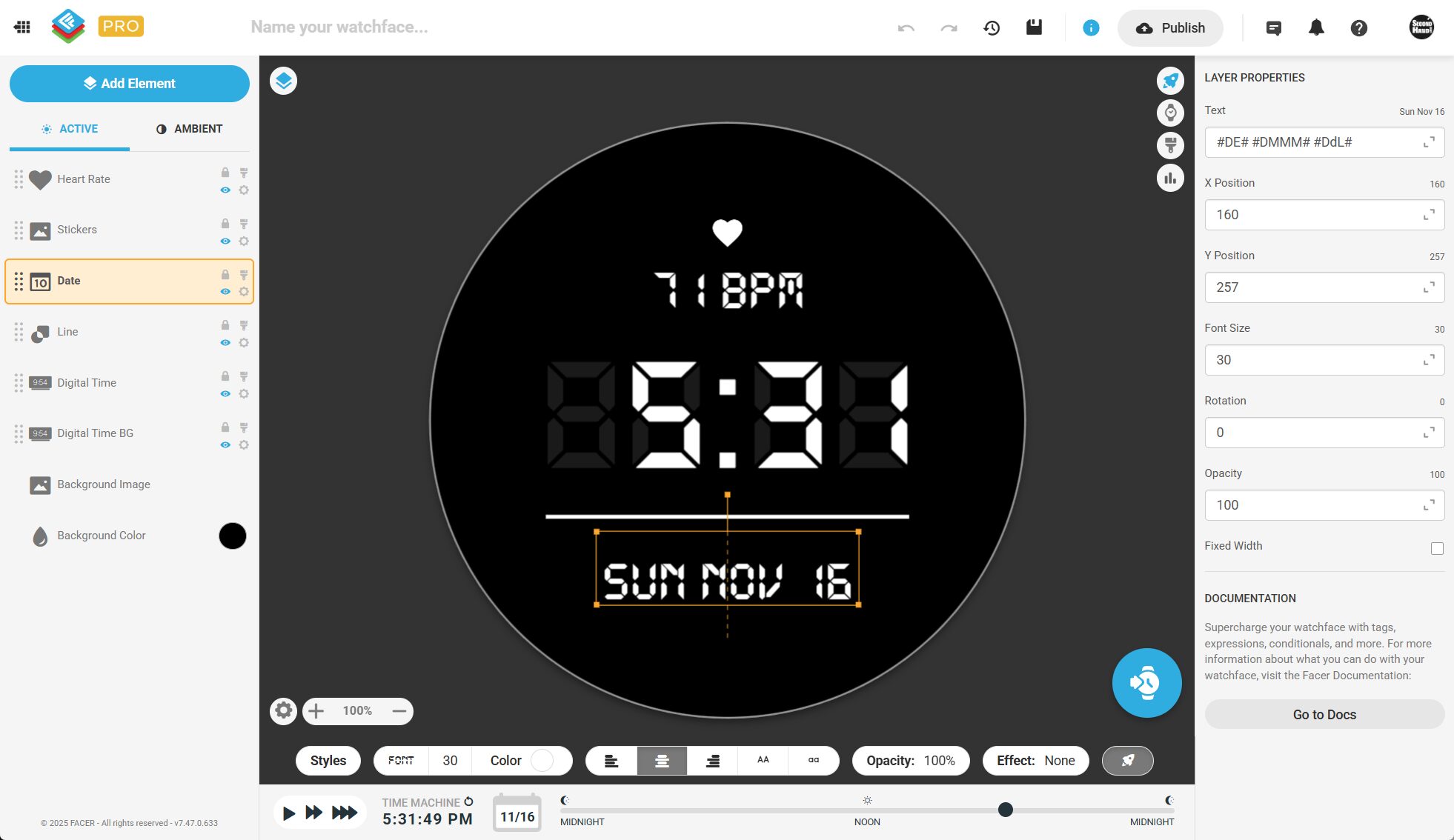
The UI is where you spend all of my time with the program, and I found Facer’s UI incredibly easy to navigate. Everything was grouped together into sections, making it easy to find what I wanted without having to search around. The left side let me add “elements” (shapes, text, colors, etc.) and those objects appeared in a list. I could easily show or hide objects using the “eye” icon, and determine what object would be in front of or behind another by changing the order of the list. Elements higher in the list are in front of elements lower in the list. I could even duplicate elements if I needed more than one of an element I already created. The center area shows what the watch face would look like, based on the elements that were added to the list.
In addition, the “current time” can be changed by using the slider at the bottom to see what the watch face looked like at different times of day. This is very helpful with layout, because some fonts cause numbers to shift depending on their size. A “1” takes up less space than a “0” for instance. Finally, on the right are panels can be opened to set properties for the selected item. For example, you could set an exact position of an object using numeric coordinates, change the content of a text element to show the desired text, or even use variables to show dynamic content such as the current step count. It was all pretty intuitive, and I had no trouble using Facer to get started with my project.
Here’s an example of what you see when opening the Facer’s “Digital” template for Wear OS:
Facer’s Vocabulary
Every program has a user interface and a set of features. It’s up to the user to learn how to interact with the program, access the features, and make it do what you want. I call this the program’s “vocabulary”, and mastering the vocabulary will not only make you more efficient at using that program, but you’ll also learn ways to make it work for you, perhaps in ways that weren’t even intended. When a program is difficult to use from the start, it’s said to have a “steep learning curve.” Fortunately, I found that using Facer was quite simple. The user interface was intuitive and I was able to quickly learn its basic functions. Once I saw how easy it was to use, I immediately upgraded to Facer Creator Pro so I would have access to all of its features and could publish advanced designs without limitation.
There are many sites and videos that provide in-depth instructions for using Facer. Covering Facer in detail is beyond the scope of this post, so instead I’ll touch on the three areas that drew me in:
- Templates are helpful in unexpected ways. While they can create “cookie-cutter” watch faces, they were my “hello world” of watch design. Starting with a template was a quick way to get a working watch face on my wrist, which was incredibly satisfying. It also allowed me to explore how the pre-built elements worked and how I could customize them.
- Elements are the building blocks of your watch face. Facer puts all of its options in a single panel, which made it easy to see everything I had access to in one spot. I could add not just text and images, but also things like progress bars, analog hands, and real-time data like step count and heart rate. I added each element one by one, tried out its options, and quickly got the hang of the platform. This proved that using Facer provided the intuitive tools I needed to build my vision.
- Publishing is surprisingly easy. The Facer app simplifies the process by handling distribution for both Wear OS and Apple Watch designs. This made it possible for me to get my watch face out into the world with a few clicks, without any of the complications I had anticipated. It even creates an attractive working, animated preview, to show how the watch face works. The ease of publishing gave me confidence that Facer could effectively get my designs out to the world.
From Music Fan to Vision
I began tinkering around by clicking through the interface and testing the options. I added numbers showing the time, I added hands and then imported images and practiced positioning them and using the various functions offered. I was sold because something that was once complex, was now extremely easy to do.
Now that the tools weren’t limiting my creativity, I needed a vision. What type of design did I want to create? I had so many ideas, but I needed to start simple and not go too crazy, or get over-ambitious with my first project. When you need inspiration, turn to the things you love. For me, it was music, specifically 80’s New Wave. Having grown up in New York in the 80’s, I spent a lot of time listening to the incredible music of those times on WLIR and later, WDRE. These stations provided access to incredible music and was the first to play many of the artists that you know and love. You can still listen to the music of these stations on DARE FM or on Sirius XM’s First Wave. If you’d like to learn more about the New Wave scene in New York back in the 80’s, check out the incredible documentary, New Wave: Dare To Be Different.
Music is a broad category and needed something more specific. As I stared at the circular face of my Google Pixel Watch 2 my thoughts immediately turned to a famous 80’s band’s logo that was also circular. In fact, this band had just come to town and I was fortunate to catch their performance a few weeks prior. That band? Men Without Hats, creators of the well-known song, The Safety Dance. It would be this band’s logo that became the basis for the very first published watch face.
Now that the band has been revealed, the real question is: How did I take the iconic, simple circle-and-hat logo and turn it into a functional watch face that not only I could use, but others could as well? And most importantly, how did a fan like me end up getting the attention of Men Without Hats themselves? I’ll share the design story, reveal the final watch face, and detail the band’s reaction in the next post!