
SHL Charting Time is a dedicated Wear OS watch face engineered specifically for nurses, clinicians, and shift workers. Designed to eliminate documentation friction and reduce mental fatigue during demanding shifts, Charting Time provides simultaneous 12-hour and 24-hour time displays, instant future charting offsets, an integrated 60-second vitals timer, and high-visibility Atkinson Hyperlegible typography.
Dial Architecture & Display Overview
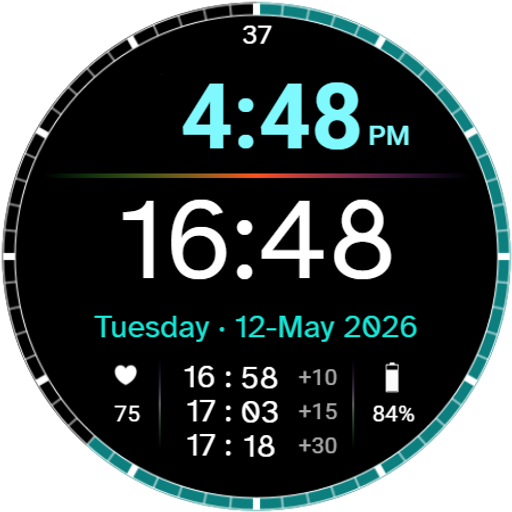
The layout is organized into distinct, high-contrast operational zones:
- Top Zone (12-Hour AM/PM Time): A clean, standard 12-hour digital readout with an AM/PM indicator, rendered at 80% opacity in your selected accent color.
- Center Zone (24-Hour Clinical Time): Prominently featured in high-contrast white using Atkinson Hyperlegible digits with a slashed zero to ensure zero character ambiguity in dark or rapid-assessment environments.
- Date Row: Full weekday, day, month, and year displayed in crisp 100% accent color.
- Shift Offsets (Bottom Center): Pre-calculated future timestamps for +10, +15, and +30 minutes.
- Vitals & Hardware Status (Bottom Flanks): Current heart rate (BPM) on the lower left and dynamic battery status on the lower right.
- Outer Bezel Track: 60-second continuous sweeping progress ring with high-contrast five-minute interval markers.
Hero Feature: The 60-Second Vitals Bezel Timer
Wear OS Watch Face Format (WFF) does not natively allow arbitrary stopwatch execution without launching external apps. Charting Time solves this limitation with a synchronized 12-node timer system built directly into the dial.
How It Works
Along the outer ring are 12 hidden timer nodes positioned at every 5-minute marker (00, 05, 10, 15, 20, 25, 30, 35, 40, 45, 50, 55 seconds).
- Observe the Sweep: Look at the continuous outer progress ring to see the current second.
- Tap Ahead: Tap the 5-minute marker immediately ahead of the sweeping arc (for example, if the sweep is currently at 17 seconds, tap the 20-second marker at the 4 o’clock position).
- Countdown & Sweep: The tapped node displays a digital countdown (e.g.,
57,58,59,00), followed by an active count from0to60as the sweep completes a full revolution. - Dismiss / Reset: Tap the active marker again to dismiss the counter.
Shift Charting Offsets (+10, +15, +30 Min)
To reduce mental arithmetic during busy shifts, the bottom center cluster automatically computes and displays the exact 24-hour future timestamps for upcoming intervals ahead of the current station time. These calculated offsets update continuously with the system clock:
- +10 Minutes
- +15 Minutes
- +30 Minutes
Tap Actions & Interactive Touch Zones
Charting Time includes built-in interactive tap targets to streamline shift workflows:
- Four Flanking Complication Shortcuts: Four customizable app launcher slots flank the center 24-hour clock (two on the left, two on the right). Assign your most-used shift tools, hospital paging apps, drug reference guides, or calculators.
- Shift Offsets Cluster: Tap anywhere on the
+10 / +15 / +30block to open the system Alarm app. - Heart Rate Icon / BPM: Tap the heart icon or value to open the system Heart Rate monitor.
- Battery Icon / Percentage: Tap the battery gauge to open Battery Status / Settings.
Actionable Multi-State Battery Monitor
To ensure clinicians are never caught with a dead watch mid-shift, the battery indicator (icon and percentage) dynamically updates its color based on remaining charge:
| Battery Level | Display Color | State Meaning |
| 21% – 100% | White | Normal operation; blends seamlessly with shift data. |
| 11% – 20% | Amber / Gold | Low battery warning; indicates time to top up before next rounds. |
| 0% – 10% | High-Urgency Red | Critical state; immediate charging recommended. |
Always-On Display (AOD) Mode
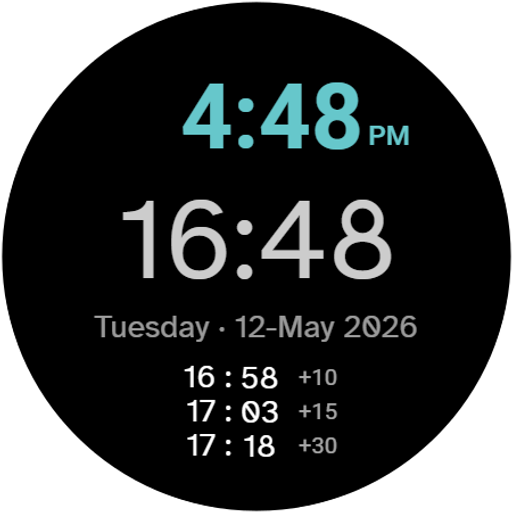
Charting Time features an ambient mode engineered for battery conservation while maintaining essential situational awareness:
- Ambient Retention: The 12H time, 24H time, date, and calculated future offsets remain visible in low-power ambient mode.
- Timer Background Persistence: If an active timer is running when the watch enters AOD, a solid status dot appears precisely at the active marker location (in place of rapid second digits, which Wear OS restricts to 1 update/min in ambient mode).
- Instant Wake Sweep: Waking the screen immediately restores the running digital seconds and live arc sweep at its exact real-time position.
- Ultra-Low OPR: Operates with an optimized On-Pixel Ratio between 5.3% and 8.5% on pure OLED black.
Customization: 10 Curated Color Palettes
Customize Charting Time by long-pressing the watch face and tapping Customize:
- Default Theme: A high-visibility, high-contrast palette engineered for clinical readability under harsh fluorescent lighting.
- Cool Palettes: A selection of crisp, soothing tones ranging from deep blues to fresh greens.
- Warm & Low-Light Palettes: A versatile range of amber, rose, and soft spectrum tones suited for evening shifts and low-light patient rooms.
Disclaimers
- Non-Medical Device: SHL Charting Time is an informational reference and documentation assistance tool only. It is not certified as a medical device and is not intended for the diagnosis, monitoring, or clinical management of any medical condition.
- Verification Required: Clinicians are responsible for verifying all charting timestamps, calculations, and logs against official hospital-synchronized master clocks and EHR facility systems.
- Daylight Saving Time (DST): While system time adjusts automatically, always manually verify offset calculations against official station time during “Spring Forward” or “Fall Back” transition hours.